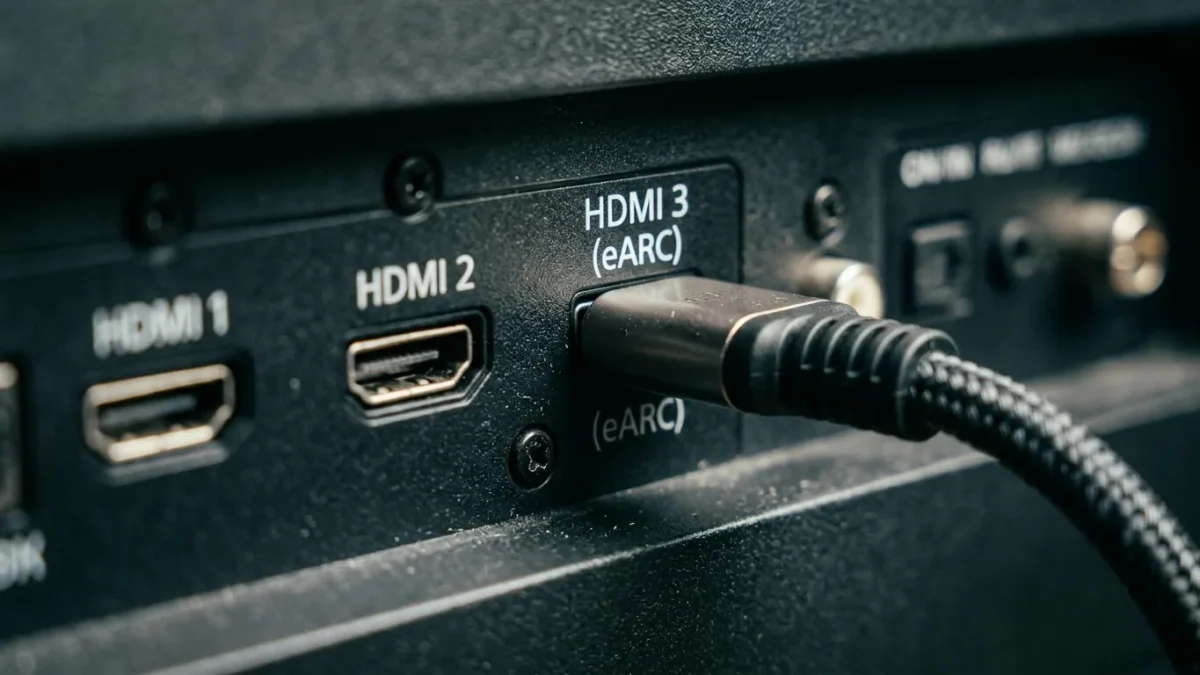
The primary difference between HDMI ARC and eARC is bandwidth: standard ARC tops out at roughly 1 megabit per second of audio data, while eARC handles up to 37 megabits per second to support uncompressed multi-channel audio such as Dolby TrueHD and DTS-HD Master Audio. This gap determines whether your soundbar or audio receiver reproduces raw studio sound or a compressed stream.
At BoringMagazine.Co, we cover audio and video specifications by breaking down the engineering without marketing noise. Readers following our Technology guides know that small connection details often dictate the performance of an entire entertainment room. Connecting a modern console or media player to a high-end display requires understanding where audio bottles up along the chain.
How Audio Return Channel Works in Modern Televisions
Traditional audio connections required separate cables to route sound from your display to an external receiver or soundbar. Before Audio Return Channel appeared in 2009 with HDMI 1.4, viewers used optical TOSLink or analog RCA cables alongside standard video cables. This created cable clutter behind media consoles and introduced sync issues between video feeds and sound output.
The Audio Return Channel protocol sends audio downstream from the television over the same HDMI cord that sends video upstream from a source device. When you stream video directly from a smart TV app, the TV sends sound down to your audio gear through one physical port. Standard ARC relies on two specific pins within the nineteen-pin HDMI connector to transmit audio data back to your receiver.
To control this path, the original ARC specification relies heavily on HDMI Consumer Electronics Control, commonly known as HDMI-CEC. This handshake lets your television remote control receiver volume and power states. When CEC handshakes fail or desynchronize, standard ARC often drops audio entirely, which has caused ongoing frustration for home theater owners over the past decade.
Bandwidth and Audio Format Differences
The fundamental technical distinction lies in data throughput. Standard ARC supports a total bandwidth of about 1 megabit per second. This low limit accommodates two channels of uncompressed PCM sound, or compressed 5.1 surround sound using legacy formats like Dolby Digital or basic DTS. When streaming services deliver Dolby Atmos through ARC, they pack it inside a lossy Dolby Digital Plus stream to stay under this ceiling.
By contrast, eARC expands audio bandwidth to roughly 37 megabits per second. This thirty-seven-fold increase allows your television to pass full, uncompressed eight-channel PCM audio at 24-bit resolution and 192 kilohertz. It also allows bitstream transmission for studio-quality object formats such as Dolby TrueHD and DTS:X without any compression artifacts or missing dynamic range.
The protocols handle synchronization differently as well. Standard ARC treats audio delay compensation as an optional feature, which frequently results in speech falling out of sync with actors on screen. Under the eARC specification published by the HDMI Forum, mandatory lip-sync correction is built directly into the protocol to keep sound aligned with motion pictures automatically.
Hardware and Cable Requirements for ARC and eARC
Because ARC and eARC operate under different physical and logical rules, your equipment must match the target standard. Standard ARC functions across older HDMI 1.4 hardware using High Speed HDMI cables. The audio return signals share pins with the Consumer Electronics Control and utility lines.
In contrast, eARC requires dedicated wiring inside the cable. It repurposes pins 14 and 19, which were originally assigned to the HDMI Ethernet Channel. Because of this structural requirement, you must use an HDMI cable that contains Ethernet wiring. High Speed HDMI cables with Ethernet can carry eARC, but Ultra High Speed HDMI cables certified for HDMI 2.1 provide the most reliable transmission for high-bitrate surround sound.
Your hardware must also feature designated ports. A television must have a port clearly marked with the eARC label to transmit high-bitrate data. If your soundbar supports eARC but connects to a standard ARC port on a television, both devices revert to the lowest common denominator, dropping uncompressed sound down to standard lossy streams. Just as you monitor display panels and prevent OLED burn-in with screen refreshers to maintain visual quality, matching your audio ports ensures your speakers perform as intended.
Real-World Home Theater Setups
Understanding which standard you need depends on your media sources and your listening equipment. If you listen through basic television speakers or a modest two-channel soundbar, standard ARC handles your needs without trouble. Streaming apps like Netflix, Disney+, and Amazon Prime Video stream audio in compressed Dolby Digital Plus formats that fit within ARC limits.
For Blu-ray collectors and modern console gamers, eARC makes a noticeable difference. Physical 4K Ultra HD Blu-ray discs store soundtracks in uncompressed Dolby TrueHD or DTS-HD Master Audio. When a player connects directly to your television, an eARC connection passes that full soundtrack down to an external surround sound system without downmixing or lossy re-encoding.
Gaming consoles like the PlayStation 5 and Xbox Series X also profit from eARC. These consoles output multi-channel uncompressed linear PCM for real-time positional sound in games. Standard ARC cannot carry uncompressed multi-channel PCM, so it forces the console to either downgrade to stereo or compress the audio into Dolby Digital, which introduces noticeable audio latency during gameplay. With eARC, games transmit full 5.1 or 7.1 uncompressed audio with zero processing delay.
Common Mistakes and Misconceptions About eARC
Many consumers believe that buying an HDMI 2.1 television automatically guarantees eARC support across every single input. In reality, manufacturers usually designate only one specific port for eARC duties. Connecting your soundbar to HDMI 1 when eARC sits on HDMI 3 prevents high-bandwidth audio pass-through from working at all.
Another common mistake involves television audio output settings. Even with the proper ports and cables connected, many smart televisions default to optical or standard PCM output modes. You must open your display audio settings and select eARC mode, pass-through, or bitstream. Setting the output to auto can cause the television to re-encode high-resolution audio into compressed formats before sending it down the wire.
People also assume that eARC requires HDMI-CEC to stay enabled for audio transmission. While CEC remains useful for controlling system volume with a single remote, eARC has its own internal discovery channel. It detects connected audio hardware independently of CEC, reducing the connection dropouts that plagued earlier ARC setups when multiple HDMI devices clashed over CEC commands.
FAQ
Can standard HDMI ARC pass Dolby Atmos?
Standard HDMI ARC can pass Dolby Atmos, but only when compressed inside a lossy Dolby Digital Plus container. Popular streaming services use this compressed method, meaning you can enjoy spatial audio on streaming movies without upgrading to eARC hardware. However, standard ARC cannot pass uncompressed Dolby TrueHD Atmos tracks found on 4K Blu-ray discs.
Do you need a new HDMI cable for eARC?
You need an HDMI cable with Ethernet capabilities to use eARC, and an Ultra High Speed HDMI cable offers the highest reliability. While older High Speed cables with Ethernet technically include the necessary wiring, older budget cables often lack sufficient shielding to prevent signal degradation over longer distances. Upgrading to an Ultra High Speed cable avoids dropouts when streaming 37-megabit audio streams.
Will an eARC soundbar work with a standard ARC television?
An eARC soundbar works when connected to a standard ARC television port, but sound output will drop down to standard ARC limits. The connection remains backwards compatible, allowing you to hear audio without buying a new television immediately. You will simply miss out on uncompressed 7.1 PCM, Dolby TrueHD, and DTS:X until you connect the soundbar to an eARC-equipped display.