Optical keyboard switches register keypresses by breaking or opening an infrared light beam, whereas mechanical switches rely on physical metal contacts that touch to complete an electrical circuit. This shift from physical contact to light changes how quickly a keyboard sends input signals to a computer. It also affects how long switches last under heavy typing or gaming.
At BoringMagazine.Co, we examine the practical engineering behind modern computer hardware. Understanding switch architecture helps buyers select the right keyboard without paying for marketing claims. While both switch styles offer similar physical feedback, their internal electronics function in completely separate ways.
How Traditional Mechanical Switches Operate
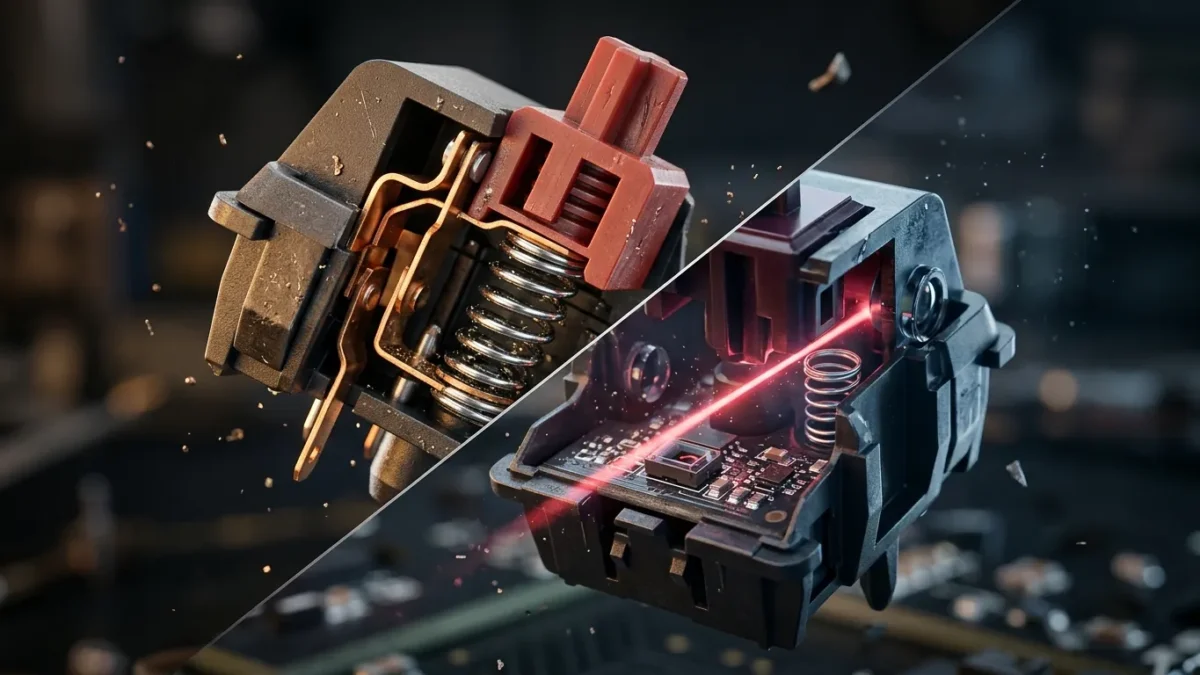
Traditional mechanical switches have served as the personal computer standard for decades. Inside each switch housing sits a spring, a plastic stem, and two flexible metal leaves made from copper or bronze alloys. When you press a key down, the stem pushes against one metal leaf. As the stem descends, the two metal contacts collide, completing an electrical circuit that registers the keypress.
Because these metal leaves are thin and flexible, they do not simply touch and stop. When they strike each other, they vibrate and bounce for several milliseconds before making firm contact. This physical bounce produces electrical noise known as contact chatter. Without correction, a single keypress would register as multiple rapid inputs.
Keyboard manufacturers solve chatter with firmware filters called debounce algorithms. The controller waits a set period, typically five to twenty milliseconds, to ensure the metal leaf has finished bouncing before confirming the input. While debounce delays prevent accidental duplicate letters, they introduce an unavoidable delay to every keystroke.
How Optical Keyboard Switches Work
Optical switches replace flexible metal leaves with optical sensors. Each switch position features an infrared light-emitting diode (LED) and a photodetector sensor. In most designs, these electronic parts sit directly on the keyboard circuit board, while the switch housing contains only a stem, a return spring, and a light-blocking shutter.
When an optical switch rests in its up position, the stem blocks the infrared beam. Pressing the key lowers the stem until an opening allows the light beam to hit the sensor. Other designs keep the beam open until the stem drops to block it. In both designs, the sensor registers the keypress the moment the light state shifts.
Light does not bounce or vibrate like physical copper. When the beam hits or clears the photodetector, the sensor produces a clean signal change without physical bounce or electrical chatter.
Debounce Latency and Input Speed Differences
The lack of contact chatter allows optical switches to bypass debounce delays entirely. The keyboard controller transmits the keypress to your operating system the instant the sensor detects the light change. This difference cuts input latency by three to fifteen milliseconds compared to mechanical switches using standard debounce filters.
Some mechanical keyboards reduce this latency through eager debounce algorithms that register the first contact immediately. However, as mechanical contacts age and oxidize, eager algorithms can cause unwanted double-clicks. Optical switches avoid this risk because their signal comes from light rather than physical friction.
Hardware engineers frequently work to cut signal delays across computing systems. For example, understanding how dedicated wireless backhaul cuts latency in mesh networks shows how removing transmission bottlenecks speeds up overall performance. Optical switches apply a similar logic by removing mechanical contact delays at the physical input stage.
Durability, Longevity, and Environmental Resistance
Physical contact creates friction and structural wear. In a mechanical switch, metal leaves bend and rub together with every strike. Over millions of actuations, copper loses elasticity, oxidizes, or corrodes from room moisture. Dust or spilled liquids can settle between contacts, causing dropped inputs or repeated keystrokes.
Optical switches eliminate metal-on-metal electrical wear. Because actuation depends on light crossing an open path, there are no delicate copper leaves to fatigue or rust. Standard mechanical switches carry ratings of 50 to 80 million keystrokes, whereas optical switches often reach 100 million keystrokes.
Hardware components inevitably face wear from repeated use, a concept explained in our guide on preventing OLED burn-in with pixel refreshers. In optical keyboards, the switches avoid electrical contact failure, but dust can settle inside the switch housing. If debris blocks the optical channel, the sensor can misfire until cleared with compressed air.
Real Examples and Commercial Switch Designs
Several manufacturers produce commercial optical keyboards for gaming and office use. These designs demonstrate how optical sensing functions across various products:
- Razer Optical Switches: Used in Huntsman keyboards, these switches place an infrared beam inside each switch housing, paired with a metal stabilizer bar for even key travel.
- Gateron Optical Switches: Popular in budget and modular keyboards, these switches use standard stems and springs but omit metal pins, working solely with board-mounted optical sensors.
- Bloody LK Series: Designed by A4Tech, Light Strike switches were among the earliest consumer optical models focused on reducing competitive gaming latency.
- Analog Optical Switches: Some advanced boards measure the amount of light reaching the sensor as the stem descends, allowing users to customize actuation points or simulate analog thumbstick movement.
Readers exploring peripheral upgrades can consult our Technology guides for detailed hardware breakdowns.
Common Misconceptions About Optical Switches
One common myth is that optical switches feel numb and cannot provide tactile feedback. In truth, typing feel comes from mechanical springs, plastic stems, and click bars. Optical switches can be linear, tactile, or clicky, matching the physical sensation of traditional mechanical switches while registering input with light.
Another misconception is that optical switches automatically turn players into better gamers. While optical switches eliminate debounce delay, average human reaction time remains between 150 and 250 milliseconds. Saving a few milliseconds of switch delay is helpful, but monitor refresh rates, mouse precision, and personal practice matter far more.
Finally, buyers often assume optical switches fit any mechanical keyboard. They do not. Standard mechanical keyboards require switches with metal pins that insert into solder pads or hot-swap sockets. Optical switches have no pins and only work on specialized boards equipped with optical sensors.
FAQ
Do optical keyboard switches feel different from mechanical switches?
Optical switches feel almost identical to traditional mechanical switches because both styles use similar springs, stems, and switch housings. You can buy optical switches in linear, tactile, or clicky variations. The only small tactile difference is that linear optical switches can feel slightly smoother since no metal leaf rubs against the stem during actuation.
Can you install optical switches into a regular mechanical keyboard?
No, optical switches cannot be installed into standard mechanical keyboards because they lack electrical contact pins. Traditional circuit boards require metal pins to complete an electrical circuit. Optical switches only function on dedicated keyboards that feature optical sensors mounted directly to the printed circuit board.
Are optical keyboard switches waterproof?
Optical switches resist water damage better than mechanical switches, but an optical keyboard as a whole is not completely waterproof. The switch housing lacks delicate copper leaves that rust, but liquid spills can still reach the printed circuit board underneath. If moisture shorts the controller or damages the power traces, the keyboard will fail even if the switches survive.